Wallpaperz Mania

Author: @k$h@y // Category:
MOBILE/Ipod Wallpapers 1
This Collection Contains About 250 Wallpapers
There Are Various Wallpapers Like
Skulls,Cool Designs,Cool logos,All The Things An Mobile loving Person Wants
DOWNLOAD


MOBILE/Ipod Wallpapers 2
This Collection Contains About 225 Wallpapers
There Are Various Wallpapers Like
Coolest Cars ,Game ScreenShots,Humourous Wallpapers Etc
DOWNLOAD


Wanna See Some Of Them


 alt tag  alt tag alt tag
 alt tag  alt tag alt tag

 alt tag alt tag alt tag


 alt tag alt tag alt tag

 alt tag alt tag alt tag


 alt tag alt tag alt tag

 alt tag


MOBILE/IPOD Wallpapers 3
This Collection Contains About 225 Wallpapers
There Are Various Wallpapers Like
Here Are Wallpapers With Attitude
If You have Attitude Problem Download This To Increase ur Problem
DOWNLOAD


Mobile/IPOD Wallpapers 4
This Collection Contains About 275 Wallpapers
There Are Various Wallpapers Like
If U Are looking For Cute Wallpapers This Is The Pack For You
It has Cute Roses,Cute Hearts Etc
DOWNLOAD


Mobile/IPOD Wallpaper 5
This Collection Contains About 275 Wallpapers
There Are Various Wallpapers Like
This pack Contains Logos Of Top Company's And They Are made Comedy In Unique Way
All The Ericson,Nokia,Coco-cola,Adidas,Lacoste , West Coast Customs Logos Are For U
DOWNLOAD


Mobile/IPOD Wallpapers 6
This Collection Contains About 255 Wallpapers
There Are Various Wallpapers Like
All The Scary And Most Funny Wallpapers Here
DOWNLOAD


Note-
Password=www.coolmobileandpc.blogspot.com

Now These Are Wallpapers With Resolution 240x320
Hence They can Be Seen Full Screen in Any Mobile/Ipod
It Supports All Mobiles And Ipod Till Screen Of 3 Inches
Means China mobiles With Huge Screens Are Too Supported

IF U Need Any Type Of Wallpapers Then Contact Me
Breaking the Restrictions of the Administrator

Author: dg hd // Category:

A Loophole u never knew about 


This works on WIn 2000 & WIN XP. 

Dis can be used to gain access to the website you want to 
for free, and how you can gain access to 'control panel', and the various 
other tools of Widows that may have been blocked from your grasp like 'regedit' by the administrator. IT can be used in schools & colleges.. 

When u are at the log on screen, type in your username and 
password. NOW When you hit enter, and it comes up with 
the next screen, the rectangle one, immediatly pull out the network 
cable i.e. the cable wire. 

Now u can log on without any restrictions because when the cable is pulled off then it does not download any settings from the server. Now you have access to control panel, & all the other features which had been blocked BUT there will be no 
network access. But that's cool because now we can access 'Internet options', 
click in the 'connections' tab click the LAN settings, click the proxy 
settings, and in the little white box at the bottom we can specify websites 
that bypass the proxy server (eg www.yahoo.com) Now once you have changed 
the settings to what you wish, apply them and restart the computer. Now get someone else to log onto it because if you log in it will load the cached settings from your previous log in, then after the other person logs in, everyone that logs in after them included themselves will have the 
internet settings you specified. 

Its only an 'Unplugging technique' to gain access to a comp. locked by the administrator. 

Now you can gain access to msconfig, regedit, command etc disable the virus scanner, or to install a trojan or a virus according to u're will..


XP HOME ADVANCED FILE PERMISSIONS.!!


Access *Advance file Permissions* on NTFS file systems for XP Home simply by booting into *Safe Mode*, rt-clicking any file or folder, and navigating to the *Security tab*. This gives the user the ability to allow or deny read, write, execute, read & write, display contents, full-control, iheritance, and take ownership permissions, with many more options available to apply to different users and groups stored on the computer. Well, you don't have to do this in *Safe Mode* (XP Home). Although it is a little less intuitive, you can simply go to your command prompt - Start>All Programs>Accessories>Command Prompt. Now type "cacls" in the window (without the quotes). This gives you the ability to add, remove or modify file permissions on files and folders through the command prompt. Type "cacls /?" for help on different options and variables. You do not need to be in safe mode to use this so it makes it a little quicker than using the safe mode security tab GUI. Remember - this only applies to NTFS. Here also is a very useful link to find a lot of extras and tweaks straight from the horse's mouth - the Microsoft Resource Center. You will find a lot of very useful web-based extra's here, most of them left unknowing to the general public - such as, "Online Crash Analysis" - a site that looks like Windows Update but you can upload your crash "dump logs" (when you get those system or application crash error reports). Microsoft will then analyze the log file and tell you some more info about WHY the system crashed (ie. faulty hardware/software/conflicts, etc).
      by ABEL THE LEGEND

Author: @k$h@y // Category:

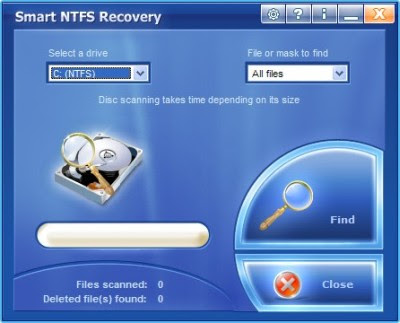
Smart NTFS Recovery 3.9 Portable


Smart NTFS Recovery is a data recovery tool for Windows operating system that supports the NTFS file system.Smart NTFS Recovery easily recovers data from hard disks and any type of storage media - USB drives, flash drives, PC card, memory stick, multimedia card, secure digital card with NTFS file system.

Smart NTFS Recovery applies a simple yet powerful algorithm, which makes it possible to restore your lost data quickly and effectively.Smart NTFS Recovery can recover any deleted files, including MS Office
files, photos, mp3 and zip files.

Smart NTFS Recovery is able to restore all sorts of files, including electronic documents and pictures. It restores files from NTFS hard drives, has really simple interface and is compatible with Windows operations systems. Our aim is to prevent information loss, and prevent you from wasting your time and money.


For different reasons, important documents and user files are sometimes lost. Without a recovery tool for documents and files, this may become a huge problem (one that leads to considerable inconveniences, and requires expensive solutions).

The software enables to remove the data concerning deleted files. Thus nobody will be able to recover the data deleted by you and use it in own interest

Author: @k$h@y // Category: , , ,
Locate Laptop v1.0 (Anti-Theft and Tracking system)
Locate Laptop v1.0 (Anti-Theft and Tracking system) | 5.95 MB

Locate Laptop 1.0 Anti-Theft and Tracking system. A recent survey stated that on an average 60 laptops are stolen or lost every week! What you lose is not only the laptop, but also valuable, sensitive and creative information in it. Do you have a plan to counter this yet? Locate Laptop is a system that locates reportedly stolen laptop, from the world wide web. And what more, it silently transfers your critical information on our secure data server. Laptop Locator also encrypts your sensitive information, without the knowledge of the offender!

Features:
* Provides current location along with IP address and service provider.
* Customise reporting on Laptop Location as per your choice.
* Secure web page for every user to monitor the laptop/ persons location.
* Remotely launch the data encryption once theft is reported.
* Automatic/ silent data encryption if Laptop is not connected to internet for a specified period.
* Works in stealth mode.

Advantages:
* Fastest tracking of Laptop once theft is reported.
* Tracks the laptops/ Employee locations on regular basis.
* Protects Sensitive data/ information being used by competitors due to Laptop theft.
* Online location statistics is available any time from any where through www.locatelaptop.com.
* Reporting via email on regular intervals as per your choice.

Homepage: www.locatelaptop.com


Author: @k$h@y // Category: , ,
  • Now make Ur Windows Xp Geniune Using These Softwares


Windows Genuine Advantage Validation 1.7.18.1


or

Windows Genuine Advantage Validation v1.9.9.1 CRACKED


OR


Speed Up XP Booting.

Author: dg hd // Category:


Start Registry Editor (Regedit.exe).

Locate the following key in the registry:

HKEY_LOCAL_MACHINE\SYSTEM\Current
 ControlSet\Control\Ses sionManager\MemoryManagement\Prefetch Parameters

Make sure you backup the keys by exporting them to a .reg file.

On the EnablePrefetcher value, change the setting from 3 to 5 (decimal).

Close the registry editor.


BY ABEL THE LEGEND

Restart your computer.